Problem
What is the Problem
Problem is the foundational interface for UQPyL. It integrates necessary elements to define and solve a analysis or optimization problem. Specifically, a problem instance should include:
-
Decision Variables: - Information about the decision dimension, variable names, ranges, and types.
-
Problem Function: - Python functions that maps decision variables to output values, including objectives and/or constraints.
Overview of Problem class
For convenience, the UQPyL.problems module provide the Problem class, served as a container for all essential information required to define a problem instance.
Here, we give API reference for Problem class.
Class Problem
The `Problem` class is designed to define specific optimization problems. It extends the abstract base class `ProblemABC` and allows users to specify custom objective and constraint functions.
Constructor:
__init__

Initializes a new instance of the Problem class.

- Parameters:
    - nInput(int): The number of input variables
    - nOutput(int): The number of output variables
    - ub(int, float, np.ndarray, list): Upper bounds for input variables.
    - lb(int, float, np.ndarray, list): Lower bounds for input variables.
    - objFunc(callable): User custom objective function. Default: None.
    - conFunc(callable): User custom constraint function. Default: None.
    - evaluate(callable): User custom evaluation function. Default: None
    - conWgt(list): weights for combining constraints.
    - varType(list): List of variable types. 0 for continuous, 1 for integer, 2 for discrete.
    - varSet(list): Sets of possible values for discrete variables.
    - optType(str, list): Optimization type. 'min' for minimization, 'max' for maximization.
    - xLabels(list): Labels for input variables.
    - yLabels(list): Labels for output variables.
    - name(str): Name of the problem.
Methods:
objFunc

- Description:

This method is used to compute objective values for a given 2D NumPy array of input samples. The function becomes available when the user defines or overrides it.

- Parameters:
    - X(np.2darray): A 2D NumPy array where each row corresponds to a set of input variables for which the objective value is to be evaluated.

- Returns:
    - np.2darray:  A 2D NumPy array containing the objective values corresponding to each input set.
conFunc

- Description:

This method is used to compute constraint values for a given 2D NumPy array of input samples. The function becomes available when the user defines or overrides it.

- Parameters:
    - X(np.2darray): A 2D NumPy array where each row corresponds to a set of input variables for which the constraint value is to be evaluated.

- Returns:
    - np.2darray:  A 2D NumPy array containing the objective values corresponding to each input set.
evaluate

- Description:

The method is used for calculating both objectives and constraints. By default, it internally calls `objFunc` and `conFunc`. Users may also define or override this method to implement a custom evaluation process.

- Parameters:
    - X(np.2darray): A 2D NumPy array where each row corresponds to a set of input variables for which the constraint value is to be evaluated.

- Returns:
    - dict: A dictionary containing:
        - 'objs': A 2D NumPy array of objective values.
        - 'cons': A 2D NumPy array of constraint values (if defined).
How to define problem
Take the variant of the Rosenbrock function as example:
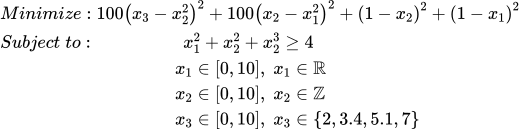
Compared to original Rosenbrock, this problem is involve extra constraint functions ( x_1^2+x_2^2+x_3^2 \ge 4 ) and changes the variable types, from the origin continuous and float to int ( x_2 ) and discrete ( x_3 ).
# For simplifying the process of defining problem, UQPyL provide a `Problem` class

# Step 1: Import `Problem` class from the `problems` module of UQPyL
from UQPyL.problems import Problem

# Step 2: Defining the `objFunc` function
# The `objFunc` function accepts a 2-dimensional(2D) NumPy array `X` and
# returns a 2D NumPy array `objs`.
#
# Accept:
#   X = [ [1, 2, 3],   # Each row represents a decision (or solution)
#         [4, 5, 6],   # Each column represents a specific variable
#         [7, 8, 9] ]
#
# Return:
#   objs = [ [1],      # Each row represents the objective value(s)
#            [2],                     corresponding to a decision in `X`
#            [3] ]
#
# Note:
#   - If there are N decisions and M objectives, the shape of `objs` should be (N, M)
#   - Users must ensure that `objs` is a 2D NumPy array

def objFunc(X):
    # If possible, advise vectorizing operations on 2D Numpy array X
    # to improve computational efficiency.

    objs =100 * (X[:, 2] - X[:, 1]**2)**2+ 100 * (X[:, 1] - X[:, 0]**2)**2  + \
            (1 - X[:, 1])**2 + (1 - X[:, 0])**2

    return objs[:, None] # Ensure the returned `objs` is a 2D numpy array.


# Alternative Usage:
#
# When using computational models where vectorized operations on the input `X` are not feasible,
# UQPyL provides a convenient alternative: the `@singleFunc` decorator.
#
# This decorator enables "single-run" mode, where `objFunc` accepts
# a single input at a time. The input should be a Python list or 1D NumPy array.
#
# `objFunc` would returns a scalar value (int or float) for single-objective problems,
# or a list / 1D NumPy array for multi-objective problems.

# First, import the decorator from UQPyL.problems
from UQPyL.problems import singleFunc

@singleFunc
def objFunc_(X):

    # Perform calculations for each element in X

    obj = 100 * (X[2] - X[1]**2)**2 + 100 * (X[1] - X[0]**2)**2 + \
            (1 - X[1])**2 + (1 - X[0])**2

    return obj


# Step 3: Define `conFunc` function
# Similar to `objFunc`, `conFunc` also supports two modes.
#
# Note:
#   The return of `conFunc` require whether the constraints are satisfied:
#       - A negative value indicates a violation of the constraint — the smaller the
#         value, the more severe the violation.
#       - A positive value indicates the constraint is satisfied, i.e., the solution
#         is feasible.
# Therefore, users need to reformulate their original constraint expressions
# to follow this convention.

# Array Mode
def conFunc(X):

    cons = X[:, 0]**2 + X[:, 1]**2 + X[:, 2]**2 - 4

    return cons[:, None] #keep 2D numpy array

# Single-run Mode
@singleFunc
def conFunc(X):

    con = X[0]**2 + X[1]**2 + X[2]**2 - 4

    return con # scaler value is feasible

# Step 4: Describe the properties of X

nInput = 3 # number of input variables, here it's 3 inputs.
nOutput = 1 # number of outputs, here it's 1 objective.

# Upper bound of X.
# It can be a float, int, list, or numpy array.
ub = [10, 10, 10]
# In this case, both input variables have an upper bound of 10.
# Optional way:
ub_ = 10

# Lower bound of X.
lb = [0, 0, 0]
# or
lb_ = 0

# Type of variables.
# Where `0` for continuous, `1` for integer, and `2` for discrete.
varType = [0, 1, 2]
# corresponding to float, integer, discrete

# For discrete variables, users should indicate the set of possible values
varSet = {2: [2, 3.4, 5.1, 7]}
# Here, following Python zero-based indexing, `2` refers to the third variable.
# This means that x3 can only take one of these four values: 2, 3.4, 5.1, or 7.

# Optimization type:
# Where 'min' for minimization, 'max' for maximization.
optType = 'min'
# Note:
# For multi-objective problems, users can specify the optimization direction
# (e.g., `min` or `max`)
# for each objective individually using a list,
# or define a global direction that applies to all objectives.

# Labels of each input variables.
xLabels = ['x1', 'x2', 'x3']
# If the optimization problem includes named variables, you can define them here.
# Otherwise, default names such as 'x1', 'x2', 'x3', etc., will be automatically generated.


# Labels of each objective.
yLabels = ['obj1']
# Similar to `xLabel`, if your objective(s) have specific names, you can define them here.
# Otherwise, default labels such as 'obj1', 'obj2', etc., will be used.

# Name of the optimization problem
name = 'Rosenbrock'
# Useful for identifying the problem instance, managing results, saving files, etc.

#Step 5: Initialize the problem instance
problem = Problem(
    nInput = nInput,
    nOutput = nOutput,
    objFunc = objFunc,
    conFunc = conFunc,
    ub = ub,
    lb = lb,
    varType = varType,
    varSet = varSet,
    optType = optType,
    xLabels = xLabels,
    yLabels = yLabels,
    name = name
)

# Step 6: Optimization
# All methods and algorithms of UQPyL run by reading the `problem` objective
# Use the Genetic Algorithm (GA) as example
from UQPyL.optimization.single_objective import GA

# Create an instance of GA.
# By default, GA would output optimizing history
# and final results in the command line.
# please check tutorial for specific usage.
ga = GA()

# Run `ga` by input `problem` object
ga.run(problem = problem)

# Output:
# Time:  0.0 day | 0.0 hour | 0.0 minute |  1.17 second
# Used FEs:    50000  |  Iters:  999
# Best Objs and Best Decision with the FEs
# +-------------------+-------------------+-------------------+-------------------+
# |        FEs        |       Iters       |      OptType      |      Feasible     |
# +-------------------+-------------------+-------------------+-------------------+
# |         50        |         0         |        min        |        True       |
# +-------------------+-------------------+-------------------+-------------------+
# +-------------------+-------------------+-------------------+-------------------+
# |        obj1       |         x1        |         x2        |         x3        |
# +-------------------+-------------------+-------------------+-------------------+
# |      4.0e+02      |       0.000       |       0.000       |       2.000       |
# +-------------------+-------------------+-------------------+-------------------+
Use evaluate function to replace objFunc and conFunc
Some practical problems may be difficult to separately define the objFunc and conFunc. UQPyL recommends using evaluate function of the Problem class, instead.
Still, take this problem as example:
# both computations of objective and constraint are handled within `evaluate` function.
def evaluate(X):

    # compute objective
    objs =100 * (X[:, 2] - X[:, 1]**2)**2+ 100 * (X[:, 1] - X[:, 0]**2)**2  + \
            (1 - X[:, 1])**2 + (1 - X[:, 0])**2

    # compute constraint
    cons = cons = X[:, 0]**2 + X[:, 1]**2 + X[:, 2]**2 - 4

    # `evaluate` function should return a python dict,
    # which contain two fixed keywords: `objs` and `cons`.

    return {'objs' : objs[:, None], 'cons' : cons[:, None]} # ensure 2D numpy array

# still support single-run mode using `@singleEval`
from UQPyL.problems import singleEval

@singleEval
def evaluate(x):

    # objective
    obj = 100 * (X[2] - X[1]**2)**2 + 100 * (X[1] - X[0]**2)**2 + \
            (1 - X[1])**2 + (1 - X[0])**2

    # constraint
    con = X[0]**2 + X[1]**2 + X[2]**2 - 4

    # return a python dict with two keywords, `objs` and `cons`
    # `obj` and `con` should be scaler value (int, float) for single-objective
    # python list or np.1d-array for multi-objective

    return {'objs' : obj, 'cons' : con}

# remaining is same as the quick start example.

nInput = 3
nOutput = 1

ub = [10, 10, 10]
lb = [0, 0, 0]

varType = [0, 1, 2]
varSet = {2: [2, 3.4, 5.1, 7]}

optType = 'min'

xLabels = ['x1', 'x2', 'x3']
yLabels = ['obj1']

name = 'Rosenbrock'

# use `evaluate` keyword to replace origin `objFunc` and `conFunc`
problem = Problem(
    nInput = nInput,
    nOutput = nOutput,
    evaluate = evaluate,
    ub = ub,
    lb = lb,
    varType = varType,
    varSet = varSet,
    optType = optType,
    xLabels = xLabels,
    yLabels = yLabels,
    name = name
)
💡Note: When calling Problem.evaluate, the return value is a Python dictionary. Use the keys 'objs' and 'cons' to access the objective values and constraints, respectively — e.g., res['objs'], res['cons'].
Implement NewProblem class, which inherits from ProblemABC base class
UQPyL allows users to customize problem-based classes by extending the built-in Problem class. To do so, simply inherit from the abstract base class ProblemABC.
Still, take this problem as example:
from UQPyL.problems import ProblemABC


# For above problem, __init__ function should accept:
# nInput, nOutput, ub, lb, varType, varSet, optType, xLabels, yLabel

class NewProblem(ProblemABC):

    def __init__(nInput, nOutput, ub, lb,
                    varType, varSet, optType, xLabels, yLabels):

        # You can complete your required task here.

        # Initialization of base class must be required.
        super().__init__(nInput = nInput, nOuput = nOutput,
                            ub = ub, lb = lb, varType = varType, varSet = varSet,
                                optType = optType, xLabels = xLabels, yLabels = yLabels)

    # Override one of `evaluate`, `objFunc`, or `conFunc`.
    # Overriding all is discouraged, as it may lead to
    # untested side effects or unexpected behavior.
    def evaluate(X):

        objs =100 * (X[:, 2] - X[:, 1]**2)**2+ 100 * (X[:, 1] - X[:, 0]**2)**2  + \
                (1 - X[:, 1])**2 + (1 - X[:, 0])**2

        cons = cons = X[:, 0]**2 + X[:, 1]**2 + X[:, 2]**2 - 4

        return {'objs' : objs[:, None], 'cons' : cons[:, None]}

    # or override `objFunc` and `conFunc`
    def objFunc(X):

        objs = 100 * (X[:, 2] - X[:, 1]**2)**2+ 100 * (X[:, 1] - X[:, 0]**2)**2  + \
                (1 - X[:, 1])**2 + (1 - X[:, 0])**2

        return objs[:, None]

    def conFunc(X):

        cons = X[:, 0]**2 + X[:, 1]**2 + X[:, 2]**2 - 4

        return cons[:, None] #keep 2D numpy array
Once defined, the NewProblem class can be seamlessly used with all optimization methods and algorithms available in UQPyL. Base on this characteristic, we have developed SWAT-UQ.
Benchmark problems
In real-world applications, optimization problems are often complex and lack known solutions. This makes it difficult to:
- Evaluate the quality of a solution
- Compare the effectiveness of different algorithms
- Understand the strengths or limitations of a new algorithm
Benchmark problems provide standardized, well-understood test cases with known properties, allowing for reproducible, objective, and quantifiable performance analysis. Therefore, they play a crucial role in the evaluation and comparison of optimization algorithms.
UQPyL provides some built-in benchmark problems:
For single-objective:
| Name | Formula | Optimal Solution | Optima |
|---|---|---|---|
| Sphere | 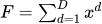 |
( 0, 0, 0 ... 0 ) | 0.0 |
| Schwefel_2_22 |  |
( 0, 0, 0 ... 0 ) | 0.0 |
| Schwefel_1_22 |  |
( 0, 0, 0 ... 0 ) | 0.0 |
| Schwefel_2_21 |  |
( 0, 0, 0 ... 0 ) | 0.0 |
| Schwefel_2_26 |  |
(420.9687 ... 420.9687) | -12569.5 |
| Rosenbrock |  |
( 0, 0, 0 ... 0 ) | 0.0 |
| Step |  |
( 1, 1, 1 ... 1) | 0.0 |
| Quartic |  |
( 1, 1, 1 ... 1) | 0.0 |
| Rastrigin |  |
( 0, 0, 0 ... 0 ) | 0.0 |
| Ackley |  |
( 0, 0, 0 ... 0 ) | 0.0 |
| Griewank |  |
( 0, 0, 0 ... 0) | 0.0 |
| Bent_Cigar |  |
(0, 0, 0 ... 0) | 0.0 |
| Discus |  |
(0, 0, 0 ... 0) | 0.0 |
| Weierstrass |  |
(0, 0, 0 ... 0) | 0.0 |
For multi-objective:
| Name | Num. of Objective | Shape of the Pareto Front | Feature |
|---|---|---|---|
| ZDT1 | 2 | Line | Convex |
| ZDT2 | 2 | Line | Concave |
| ZDT3 | 2 | Line | Disconnected |
| ZDT4 | 2 | Line | Convex |
| ZDT6 | 2 | Line | Concave |
| DTLZ1 | >=3 (user define) | Surface | Multimodal |
| DTLZ2 | >=3 (user define) | Surface | Single-peaked |
| DTLZ3 | >=3 (user define) | Surface | Multimodal |
| DTLZ4 | >=3 (user define) | Surface | Multimodal |
| DTLZ5 | >=3 (user define) | Line | Multimodal |
| DTLZ6 | >=3 (user define) | Line | Multimodal |
| DTLZ7 | >=3 (user define) | Discrete Surface | Multimodal |
All benchmark problems are implemented in the UQPyL.problems module, and are categorized into single_objective and multi_objective submodules.
User can define nInput, ub, lb for benchmark problems.
from UQPyL.problems.single_objective import Shpere

problem = Sphere(nInput = 20, ub = 10, lb = -10)