Quick Start
🍊 Define Problem
To effectively use UQPyL, the key is to define the solved problem, including:
-
The basic information of the problem, e.g., the dimension, range, type (float, int, or discrete) of each variable, the name of the problem, decisions, objectives, constraints.
-
The objective function that describe how the output
objis obtained from the inputsx, referred to asobjFuncin UQPyL. TheobjFunccan be a mathematical formula, computational model with pre- and post-processing, or external black-box process. -
If required, the constraint function should be implemented, referred to as
conFunc, which contains one or more constraints that the inputs x must satisfy.
Take the variant of the Rosenbrock function as example:
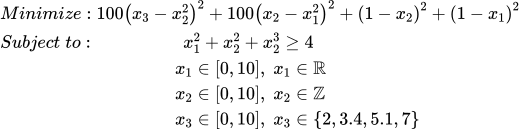
Compared to original Rosenbrock, this problem involve extra constraint functions ( x_1^2+x_2^2+x_3^2 \ge 4 ) and changes the variable types, from the origin continuous and float to int ( x_2 ) and discrete ( x_3 ).
Now, we use this problem to specifically introducing:
📘 View Jupyter Notebook example online
# For simplifying the process of defining problem, UQPyL provide a `Problem` class

# Step 1: Import `Problem` class from the `problems` module of UQPyL
from UQPyL.problems import Problem

# Step 2: Defining the `objFunc` function
# The `objFunc` function takes a 2-dimensional(2D) NumPy array `X` as input and
# returns a 2D NumPy array `objs` as output.
#
# Input:
#   X = [ [1, 2, 3],   # Each row represents a decision (or solution)
#         [4, 5, 6],   # Each column represents a specific variable
#         [7, 8, 9] ]
#
# Output:
#   objs = [ [1],      # Each row represents the objective value(s)
#            [2],                     corresponding to a decision in `X`
#            [3] ]
#
# Note:
#   - If there are N decisions and M objectives, the shape of `objs` should be (N, M)
#   - Users must ensure that `objs` is a 2D NumPy array

def objFunc(X):
    # If possible, advise vectorizing operations on matrix X
    # to improve computational efficiency.

    objs =100 * (X[:, 2] - X[:, 1]**2)**2+ 100 * (X[:, 1] - X[:, 0]**2)**2  + \
            (1 - X[:, 1])**2 + (1 - X[:, 0])**2

    return objs[:, None] # Ensure the returned `objs` is a 2D numpy array.


# Alternative Usage:
#
# When using computational models where vectorized operations on the input `X` are not feasible,
# UQPyL provides a convenient alternative: the `@singleFunc` decorator.
#
# This decorator enables "single-run" mode, where `objFunc` accepts
# a single input at a time. The input should be a Python list or 1D NumPy array.
#
# `objFunc` would returns a scalar value (int or float) for single-objective problems,
# or a list / 1D NumPy array for multi-objective problems.

# First, import the decorator from UQPyL.problems
from UQPyL.problems import singleFunc

@singleFunc
def objFunc_(X):

    # Perform calculations for each element in X

    obj = 100 * (X[2] - X[1]**2)**2 + 100 * (X[1] - X[0]**2)**2 + \
            (1 - X[1])**2 + (1 - X[0])**2

    return obj


# Step 3: Define `conFunc` function
# Similar to `objFunc`, `conFunc` also supports two modes.
#
# Note:
#   The return of `conFunc` require whether the constraints are satisfied:
#       - A negative value indicates a violation of the constraint — the smaller the
#         value, the more severe the violation.
#       - A positive value indicates the constraint is satisfied, i.e., the solution
#         is feasible.
# Therefore, users need to reformulate their original constraint expressions
# to follow this convention.

# Array Mode
def conFunc(X):

    cons = 4 - X[:, 0]**2 + X[:, 1]**2 + X[:, 2]**2

    return cons[:, None] #keep 2D numpy array

# Single-run Mode
@singleFunc
def conFunc(X):

    con = 4 - X[0]**2 + X[1]**2 + X[2]**2

    return con # scaler value is feasible

# Step 4: Describe the properties of X

nInput = 3 # number of input variables, here it's 3 inputs.
nOutput = 1 # number of outputs, here it's 1 objective.

# Upper bound of X.
# It can be a float, int, list, or numpy array.
ub = [10, 10, 10]
# In this case, both input variables have an upper bound of 10.
# Optional way:
ub_ = 10

# Lower bound of X.
lb = [0, 0, 0]
lb_ = 0

# Type of variables.
# Where `0` for continuous, `1` for integer, and `2` for discrete.
varType = [0, 1, 2]
# corresponding to float, integer, discrete

# For discrete variables, users should indicate the set of possible values
varSet = {2: [2, 3.4, 5.1, 7]}
# Here, following Python zero-based indexing, `2` refers to the third variable.
# This means that x3 can only take one of these four values: 2, 3.4, 5.1, or 7.

# Optimization type:
# Where 'min' for minimization, 'max' for maximization.
optType = 'min'
# Note:
# For multi-objective problems, users can specify the optimization direction
# (e.g., `min` or `max`)
# for each objective individually using a list,
# or define a global direction that applies to all objectives.

# Labels of each input variables.
xLabels = ['x1', 'x2', 'x3']
# If the optimization problem includes named variables, you can define them here.
# Otherwise, default names such as 'x1', 'x2', 'x3', etc., will be automatically generated.


# Labels of each objective.
yLabels = ['obj1']
# Similar to `xLabel`, if your objective(s) have specific names, you can define them here.
# Otherwise, default labels such as 'obj1', 'obj2', etc., will be used.

# Name of the optimization problem
name = 'Rosenbrock'
# Useful for identifying the problem instance, managing results, saving files, etc.

#Step 5: Initialize the problem instance
problem = Problem(
    nInput = nInput,
    nOutput = nOutput,
    objFunc = objFunc,
    conFunc = conFunc,
    ub = ub,
    lb = lb,
    varType = varType,
    varSet = varSet,
    xLabels = xLabels,
    yLabels = yLabels,
    name = name
)

# Step 6: Optimization
# All methods and algorithms of UQPyL run by reading the `problem` objective
# Use the Genetic Algorithm (GA) as example
from UQPyL.optimization.single_objective import GA

# Create an instance of GA.
# By default, GA would output optimizing history
# and final results in the command line.
# please check tutorial for specific usage.
ga = GA()

# Run `ga` by input `problem` object
ga.run(problem = problem)

# Output:
# Time:  0.0 day | 0.0 hour | 0.0 minute |  1.17 second
# Used FEs:    50000  |  Iters:  999
# Best Objs and Best Decision with the FEs
# +-------------------+-------------------+-------------------+-------------------+
# |        FEs        |       Iters       |      OptType      |      Feasible     |
# +-------------------+-------------------+-------------------+-------------------+
# |         50        |         0         |        min        |        True       |
# +-------------------+-------------------+-------------------+-------------------+
# +-------------------+-------------------+-------------------+-------------------+
# |        obj1       |         x1        |         x2        |         x3        |
# +-------------------+-------------------+-------------------+-------------------+
# |      4.0e+02      |       0.000       |       0.000       |       2.000       |
# +-------------------+-------------------+-------------------+-------------------+
🍇 Benchmark Problems
UQPyL provides some built-in benchmark problems (inheriting from Problem class) to test algorithms.
# Import single-objective problems from UQPyL.problems.single_objective
from UQPyL.problems.single_objective import Sphere, Ackley

# Import multi-objective problems from UQPyL.problems.multi_objective
from UQPyL.problems.multi_objective import ZDT1, DTLZ1

# Users can easily customize the input dimension and variable bounds as needed

# Single-objective benchmark problems
# Sphere function with 10 dimensions, bounds of all variables is [-100, 100]
problem1 = Sphere(nInput=10, ub=100, lb=-100)

# Ackley function with 15 dimensions, bounds of all variables is [-100, 100]
problem2 = Ackley(nInput=15, ub=np.ones(10)*100, lb=np.ones(10)*-100)  #

# Multi-objective benchmark problems
# ZDT1 problem with 5 decision variables, bounds use default.
problem3 = ZDT1(nInput=5)

# DTLZ1 problem with 15 decision variables, bounds use default.
problem4 = DTLZ1(nInput=15)
🍎 Sensitivity Analysis
Take Ishigami Function as example.
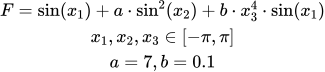
The theoretical sensitivity indices of the Ishigami function are as follows:
First-order sensitivity indices: x1 = 0.314, x2 = 0.442, x3 = 0.000
Total-order sensitivity indices: x1 = 0.558, x2 = 0.442, x3 = 0.244
📘 View Jupyter Notebook example online
import numpy as np

from UQPyL.problems import Problem

# Define Ishigami problem
def objFunc(X):
    objs = np.sin(X[:, 0]) + 7 * np.sin(X[:, 1])**2 + \
                 0.1 * X[:, 2]**4 * np.sin(X[:, 0])
    return objs[:, None]

Ishigami = Problem(nInput = 3, nOutput = 1, objFunc = objFunc,
                    ub = np.pi, lb = -1*np.pi, varType = [0, 0, 0],
                    name = "Ishigami")

# Import sensibility analysis methods from UQPyL.sensibility
from UQPyL.sensibility import Sobol

# Create a instance of `Sobol`
sobol = Sobol()

# Sampling sample
# N = 512 defines the base sample size;
X = sobol.sample(problem = Ishigami, N = 512)

# Evaluate the objective of sample points
Obj = problem.objFunc(X)

# Perform Sobol' sensitivity analysis
# Inputs:
#   - problem: the problem instance (defines bounds and function)
#   - X: the input samples
#   - Obj: the objective of X
sobol.analyze(problem, X, Obj)

# By default, the following results will be obtained:
# =======================Attribute=======================
# First Order Sensitivity: True
# Second Order Sensitivity: False
# Total Order Sensitivity: True
# ======================Conclusion=============================
# --------------------------S1---------------------------------
# +-------------------+-------------------+-------------------+
# |        x_1        |        x_2        |        x_3        |
# +-------------------+-------------------+-------------------+
# |       0.3222      |       0.4531      |       0.0175      |
# +-------------------+-------------------+-------------------+
# --------------------------ST---------------------------------
# +-------------------+-------------------+-------------------+
# |        x_1        |        x_2        |        x_3        |
# +-------------------+-------------------+-------------------+
# |       0.5436      |       0.4306      |       0.2416      |
# +-------------------+-------------------+-------------------+
🍒 Optimization
Here's an example using SCE-UA to optimize the Sphere function
📘 View Jupyter Notebook example online
# Import Sphere
from UQPyL.problems.single_objective import Sphere

# Create an instance of Sphere
sphere = Sphere(nInput = 10)

# Import SCE-UA from UQPyL.optimization.single_objective
from UQPyL.optimization.single_objective import SCE_UA

# Create an instance of Sphere
sce = SCE_UA()

# Run
res = sce.run(sphere)
# Return object `res` is a python dict, which containing optimization history and the best results

# Extract the best decision variables and objective values
bestDecs = res.bestDecs
bestObjs = res.bestObjs

# The program would display the optimization history in the command line
# =========Conclusion=================================
# Time:  0.0 day | 0.0 hour | 0.0 minute |  5.32 second
# Used FEs:    24356  |  Iters:  1000
# Best Objs and Best Decision with the FEs
# +-------------+-------------+-------------+--------------+-------------+
# |     FEs     |    Iters    |   OptType   |   Feasible   |     y_1     |
# +-------------+-------------+-------------+--------------+-------------+
# |    24122    |     990     |     min     |     True     |   4.6e-12   |
# +-------------+-------------+-------------+--------------+-------------+
# +-------------+-------------+--------------+-------------+-------------+
# |     x_1     |     x_2     |     x_3      |     x_4     |     x_5     |
# +-------------+-------------+--------------+-------------+-------------+
# |    -0.000   |    -0.000   |    0.000     |    0.000    |    -0.000   |
# +-------------+-------------+--------------+-------------+-------------+
# +-------------+-------------+--------------+-------------+-------------+
# |     x_6     |     x_7     |      x_8     |     x_9     |     x_10    |
# +-------------+-------------+--------------+-------------+-------------+
# |    -0.000   |    -0.000   |    0.000     |    -0.000   |    -0.000   |
# +-------------+-------------+--------------+-------------+-------------+
🍓 Surrogate Modeling
Use RBF model to predict Sphere Function as an example
📘 View Jupyter Notebook example online
# Generating training data
from UQPyL.problems import Sphere
sphere = Sphere(nInput = 10)

# Import Latin Hypercube Sampling (LHS) for generating design of experiments
from UQPyL.DoE import LHS

# Generate 200 training samples in the input space using LHS
lhs = LHS()
xTrain = lhs.sample(200, problem.nInput, problem = sphere)

# Evaluate the true objective of training points
yTrain = sphere.objFunc(xTrain)

# Generate 50 test samples for model validation
xTest = lhs.sample(50, problem.nInput, problem = sphere)
# Evaluate the true objective of test points
yTest = sphere.objFunc(xTest)

# Import Radial Basis Function (RBF) surrogate model
from UQPyL.surrogate.rbf import RBF

# Create an instance of RBF
rbf = RBF()
# fit the model
rbf.fit(xTrain, yTrain)

# Use the trained RBF model to predict outputs of test inputs
yPred = rbf.predict(xTest)

# Import R² to evaluate surrogate model performance
from UQPyL.utility.metric import r_square

# Compute R² score between true and predicted test outputs
r2 = r_square(yTest, yPred)
print(r2)
💡Note: For advanced usage, please check tutorial page.